PhotoFiltre 7.2.1 - Silent Installer

PhotoFiltre is an image manipulation and retouching app. With it you can accomplish simple or advanced adjustments and also apply a vast range of filters.
PhotoFiltre has a simple user interface that is intuitive to use: the app has a standard looking explorer set-up, with a tool bar providing access to the filters and drawing tools, such as pipette, displacement cursor, fill bucket, aerosol, brush, drop of water (blur), cloning stamp, smudge (finger) and magic wand.
Key features:
  • Image browser.
  • Plug-in management.
  • TWAIN compatible device scan support.
  • Transparency management for GIF images and icon export support.
  • Advanced text effects (rotation, shading, bevel).
  • Several types of contours and textures.
  • Blending and assembling of images.
PhotoFiltre has a wide range of filters to allow users to get to grips with this type of image manipulation. The app has standard adjustment functions; brightness, contrast, dyed, saturation, gamma correction, and some more artistic filters; watercolour, pastels, Indian ink, pointillism, puzzle effect etc.
PhotoFiltre has a tool called the PhotoMasque module. With this tool you can create advanced effects of transparency on your images by using pre-set masks. PhotoMasque has several basic masks and you can also create your own.
Overall, the app has some really good features and it is easy to get to grips with. The user interface is simple by design and even the novice user will be able to use the standard filter effects.

7 mb
 Don't walk as you are king, walk as you don't care who the king is....!!
Never argue with an idiot. They drag you down to their level and then beat you with experience
Adobe Photoshop 7 Lite Edition - Silent Installer


Size- 60 mb
 IDM
 
Don't walk as you are king, walk as you don't care who the king is....!!
Never argue with an idiot. They drag you down to their level and then beat you with experience
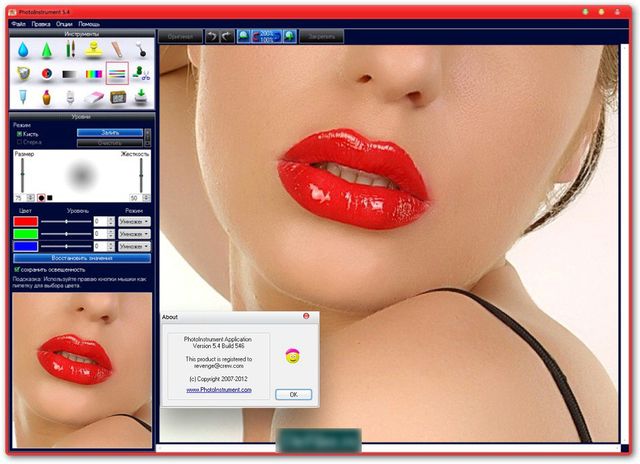
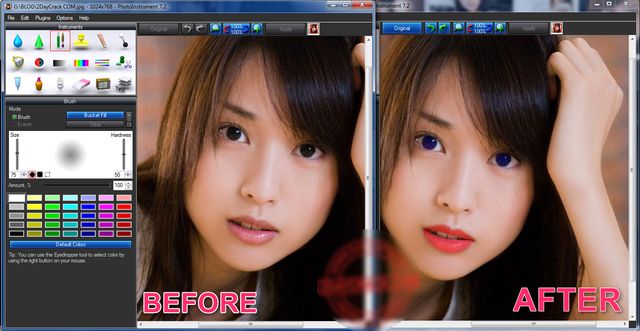
Photo Instrument 7.0 Build 706 - Silent + Pre-Registered Installer

PhotoInstrument is a powerful and easy-to-learn raster graphics editor used to process digital photographs. With only a few clicks, anyone can solve most digital photo problems:
  • Photo Editing
  • Photo Retouch
  • Draw MakeUp
  • Make your photo look like it's taken by a professional photographer.
If you ever wonder to touch up your photo, so you look more beautiful on your facebook or friendster or even on myspace, well this software is the answer to your question.

Look down for it is important features:
  • Save as Animated Gif 
  • Support Photoshop-compatible plugins
  • Add text to an image.
  • Overlay two and more images.
  • Drag and drop to open photos in this photo editor.
  • Copy/Paste image from Clipboard.
  • Batch Resizing (resize multiple images)
  • PSD file (PhotoShop Format) support in Editing.
  • Multi Language support.
  • Save to computer as .jpg, .png, .bmp and other file formats.
  • Huge brush sizes up to 500x500 pixels
  • And many more features...


5 mb
Don't walk as you are king, walk as you don't care who the king is....!!
Never argue with an idiot. They drag you down to their level and then beat you with experience
IDM 6.23 Build 12 - Repacked & Pre-Registered by CK Productions Quetta

Internet Download Manager v6.23. Added Windows 10 compatibility. Fixed compatibility problems with different browsers including Internet Explorer 11, all Mozilla Firefox versions up to Mozilla Firefox Aurora, Google Chrome. Improved FLV grabber to save videos from web players on web pages, Google Video, MySpace TV, and other popular sites

7 mb
Don't walk as you are king, walk as you don't care who the king is....!!
Never argue with an idiot. They drag you down to their level and then beat you with experience


IDM Backup Manager - Auto Installer

IDM Backup Manager can backup files from Internet Download Manager and then restore them later whenever you need them. IDM Backup Manager also includes a cleaner and IDM List Manager which allows you to generate reports in various formats and even force unfinished downloads. 


2.2 mb
Don't walk as you are king, walk as you don't care who the king is....!!
Never argue with an idiot. They drag you down to their level and then beat you with experience
Chanchal Chandni Mehki Raat Hai - Premiere Project by Sami Mengal

Demo Video


Size - 285 mb

Mirror


Don't walk as you are king, walk as you don't care who the king is....!!
Never argue with an idiot. They drag you down to their level and then beat you with experience
مائیکروسافٹ آفس یا کسی بھی ورڈ پراسیسر کے بغیر سی وی بنائیں

بشکریہ
ایک پروفیشنل ریسومی ﴿ سی وی ﴾ بنانے کے لیے آپ کو کسی مائیکروسافٹ آفس کی کوئی ضرورت نہیں۔ اس کام کے لیے گوگل ڈاکس ہی کافی ہے، جس میں کئی خوبصورت اور پروفیشنلز ٹیمپلیٹس مفت موجود ہیں۔
اگرچہ مائیکروسافٹ آفس بھی آن لائن ’’آفس ویب ایپس‘‘ کی صورت میں دستیاب ہے لیکن اس میں محدود ٹیمپلیٹس ہیں جبکہ ریسومی کا تو ٹیمپلیٹ ہی موجود نہیں۔ اس کے علاوہ فارمیٹنگ وغیرہ بھی خود ہی کرنی پڑتی ہے۔
اس کام کے لیے گوگل ڈاکس بہت ہی آسان اور تیز طریقہ ہے۔ گوگل کی دیگر کئی سروسز کی طرح گوگل ڈاکس بھی مفت دستیاب ویب ایپلی کیشن ہے۔ گوگل ڈاکس اب گوگل ڈرائیو کا حصہ ہے جو کہ گوگل کی آن لائن فائل اسٹوریج سروس ہے۔

گوگل ڈاکس کو اپنا انتخاب بنانے کی ہماری وجہ اس میں موجود ٹیمپلیٹس ہیں۔ مائیکروسافٹ آفس میں ایک صفحے کی ہی سی وی بناتے ہوئے آپ پریشان ہو جائیں گے، کیونکہ اس میں کتنی ہی فارمیٹنگ کرنی پڑتی ہے۔ جبکہ یہی کام گوگل ڈاکس پر کرتے ہوئے آپ کو صرف اپنے کوائف کا اندراج کرنا ہے اور سی وی تیار ہو جائے گی۔
گوگل ڈاکس ٹیمپلیٹ گیلری میں جانے کے لیے درج ذیل یوآر ایل ملاحظہ کریں:
ٹیمپلیٹس استعمال کرنے کے لیے ضروری ہے کہ آپ پہلے اپنی جی میل آئی ڈی سے لاگ اِن ہو جائیں۔ اگر آپ کے پاس آئی ڈی نہیں ہے تو یہ بھی مفت بنائی جا سکتی ہے۔

     Resumeگوگل ڈاکس کی ٹیمپلیٹ گیلری میں جائیں اور 
 لکھ کر سرچ کریں۔ کئی مفت ٹیمپلیٹس آپ کے سامنے موجود ہوں گے۔


 ابتدائی درجنوں ٹیمپلیٹس کے آگے By Google Docs کا مطلب یہ ہے کہ یہ ٹیمپلیٹس گوگل نے خود تیار کرکے آپ کے لئے مفت فراہم کر رکھے ہیں۔
کسی بھی ٹیمپلیٹ کا مفت ڈیزائن دیکھنے کے لئے اس کے سامنے لکھے Previewپر کلک کریں۔
جو ٹیمپلیٹ آپ کو پسند آئیاور اسے آپ سی وی بنانا چاہیں تو اس کے آگے لکھے Use This Template کے بٹن پرکلک کریں۔
گوگل ڈاکس فوراـ"ہی اس ٹیمپلیٹ کو استعمال کرتے ہوئے آپ کے لئے نیا ڈاکیومنٹ پیش کردے گا۔


اب اس میں تدوین کرنا بہت ہی آسان ہے۔ اپنے تمام کوائف کا اس میں اندراج کر دیں۔ ڈاکیومنٹ کو محفوظ کرنے کے معاملے میں بھی پریشان ہونے کی ضرورت نہیں، کیونکہ گوگل ڈاکس آپ کی ہر تبدیلی کو خودکار طریقے سے محفوظ کرتا جائے گا۔ یہ فائل آپ کے گوگل ڈرائیو اکاؤنٹ میں محفوظ ہو جائے گی۔ جسے دیکھنے کے لیے آپ اس ربط پر جائیں:

ریسومی مکمل ہو جانے کے بعد اسے گوگل ڈاکس سے ڈاؤن لوڈ کرنا ہو گا۔اگر آپ اسے براہِ راست پرنٹ کرنا چاہیں تو فائل مینو میں سے پرنٹ پر کلک کریں۔ پرنٹنگ کے لیے براؤزر کا پرنٹ آپشن مت سلیکٹ کریں، ورنہ پورا ویب پیج پرنٹ ہو جائے گا۔
اور اگر آپ کو فائل ای میل کرنے کے لیے ڈاؤن لوڈ کرنی ہو تو فائل مینو میں سے Download as پر کلک کریں اور اپنا مطلوبہ فارمیٹ جیسے کہ ڈاک یا پی ڈی ایف وغیرہ سلیکٹ کر کے فائل ڈاؤن لوڈ کر لیں۔

Don't walk as you are king, walk as you don't care who the king is....!!
Never argue with an idiot. They drag you down to their level and then beat you with experience
Next PostNewer Posts Previous PostOlder Posts Home