Icecream Slideshow Maker - Silent Installer

Icecream Slideshow Maker is an application, which can create slideshows with music from your photos. The application is very simple to use; Simpy add images, select the effect and duration of each slide, add and customize music, then press “Create”. After your slideshow is ready you can upload it to YouTube right away.
KEY FEATURES INCLUDE:
  • Icecream Slideshow Maker supports using MP3 files as background music of a slideshow. Fade and offset settings can also be applied to the audio.
  • Each ready slideshow is saved in the program's History panel. Users can resume any project with a single click.
More than 20 various transition effects are available to choose from.

Size - 29 mb

Don't walk as you are king, walk as you don't care who the king is....!!
Icecream PDF Split & Merge - Silent Installer

Icecream PDF Split&Merge would be a standby tool for everyone who’s working with PDF documents on a regular basis. This simple yet effective program unites PDF split and merge tools within the same interface and makes the process easy due to a number of useful options. Features of Icecream PDF Split&Merge: - Split and merge features within the same interface. The program allows you to perform splitting and merging tasks with the same program – all you need to do is switch between the modes. - Splitting modes for any needs. There are 4 types of splitting modes: “Into files of 1 page”, “By groups of pages”, “Get rid of certain pages”, and “By page ranges”. - Drag&Drop support. Save some time by dragging and dropping files directly into program’s interface. - Easy merge. Add as many PDFs as you want and merge them in a single click without limitations. - Easy save. It’s possible to save files in a subfolder, original folder, or any other folder on your computer. - Unlimited imports. There are no limitations for importing in the Merge mode. - Easy preview. In-built PDF viewer allows you to preview documents prior to splitting/merging them. - Support for password protected PDFs. The program works with password protected PDFs. You won’t be able to see the content of an encrypted file without entering a valid password though. - Keeping the original layout. Pages look exactly the same after splitting/merging. Icecream PDF Split&Merge is easy to use for novice users thanks to preset splitting modes and comprehensive interface. It’s much simpler than some advanced PDF tools and thus perfect for quick splitting and merging.

Size - 7 mb

Don't walk as you are king, walk as you don't care who the king is....!!
Icecream Media Converter - Silent Installer

Icecream Media Converter is a free media converter that supports working with multiple video and audio formats. This universal media converter supports the majority of video and audio formats, such as mp4, mp3, mkv, wav, flac, flv, swf, 3gp, avi, aiff, vob, aac, wma, wmv and more.
Icecream Media Converter can convert video and audio files for such devices as Xbox, PSP, iPhone, iPad, iPod, Samsung and Blackberry smartphones and many more.
Key Features Include:
  • The bulk conversion allows you to process several files at a time.
  • Successfully converted files can be easily accessed through History panel.
  • Icecream Media Converter supports converting YouTube videos to both video and audio formats.
System Requirements: Windows 8, Windows 7, Windows 2003, Windows 2000, Windows 8, Windows Vista, Windows XP, Windows Server 2008 1.33Ghz Intel®, AMD or any other compatible processor / faster processor for netbooks; 512MB of RAM, 250MB to 5GB of free disk space.


Size - 31 mb

Don't walk as you are king, walk as you don't care who the king is....!!
Icecream Image Resizer - Silent Installer

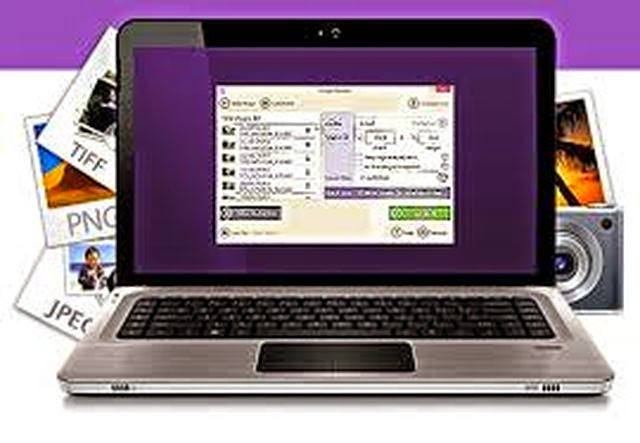
Icecream Image Resizer is a must-have tool for everyone who works with images in one way or another. It helps to resize images with ease and in advanced way. Features: - Support for popular formats, such as JPG, JPEG, BMP, PNG, and TIFF. - You can resize images in a bulk by importing the entire folder or adding files one by one. - Drag&drop support. - If you don’t know which width and height values you need in a certain case, check whether or not it’s listed in program’s preset profiles menu. - If you are looking for non-standard parameters, you can set the desired values manually. - It’s possible to keep image’s original aspect ratio and opt for vertical image recognition – just check the corresponding boxes to enable these options. Interface Program’s interface is clear and intuitive. All the main features will be available immediately after adding file(s) for resizing. Program’s design is an eye candy due to soft colors and modern style. Simplicity in use The application is really easy to figure out: just add a file or several files to program’s interface and configure the settings according to your needs. The result size will be displayed under the settings area. After that, you can resize the images in a bulk and find the output files in a folder you chose to save them in (you can select a folder while configuring the settings).

Size - 15 mb

Don't walk as you are king, walk as you don't care who the king is....!!
Icecream Screen Recorder - Silent Installer

Icecream Screen Recorder is an application for screen capture and taking screenshots. Icecream Screen Recorder can both take screenshots and capture video and you can even switch between these 2 modes very easily; Just press the button in the top left corner of the application.
Key Features Include:
  • Video can be taken with or without system sounds and microphone sounds. Desktop icons could be shown or hidden. Users can use default hotkeys or create their own hotkeys combinations.
  • The size of the area to be captured can be selected manually or users can choose one of the preset resolutions offered by application.
  • It is possible to add graphic elements like arrow, circle, rectangle, random lines and text of different colors and thickness right to the working area of the application .
Recorded video can be paused and resumed at any second interval. Screenshots can be saved as image files to your PC's hard drive, clipboard or you can even send them to Icecream Apps server and uploaded online for simple sharing.


Size - 43 mb

Don't walk as you are king, walk as you don't care who the king is....!!


GOM Player - Silent Installer

GOM Media Player gives you the ability to play all kinds of media files right on your Windows computer with no conversions required. The list of supported formats is extensive, and the many customization options let you watch your videos exactly the way that you want to.

Size - 19 mb

Don't walk as you are king, walk as you don't care who the king is....!!

Gimp - Silent Installer

GIMP is a powerful distributed program for photo retouching, image composition, and image authoring. Comparisons to Photoshop abound simply because GIMP is its most laudable free alternative. Yet, putting aside any impersonations, GIMP truly stands on its own. Like any powerful program, GIMP takes time to master but once you familiarize yourself with its tools, simple tasks take mere minutes. GIMP is a smart solution to more expensive programs that may yield less favorable results. 

GIMP at a Glance

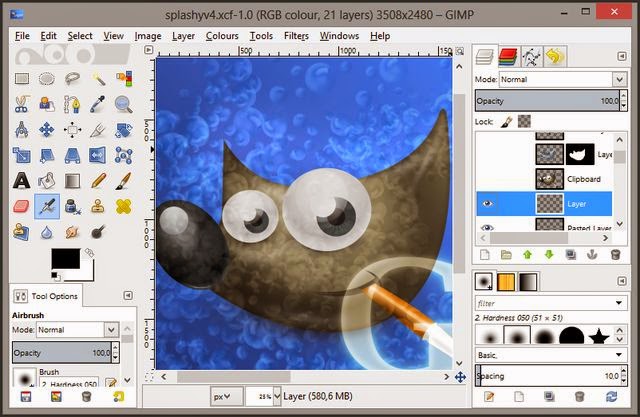
It was easy to download and launch GIMP, which isn’t surprising because of its maturity. GIMP opens to a three-part UI. The left dialog contains GIMP’s tools, while the right dialog contains its Layers, Channels, Paths, and Brushes. The center holds GIMP’s main image editing area, which you can make full screen with docking dialogs. And you can add tabs to any dialog box to help you keep the all the features you need close at hand! 

Product Details

GIMP is a versatile graphics tool and with some sophisticated built-in features such as: 
  • Customizable Interface—GIMP allows you to customize its views and behaviors. For example, you can change widget theme colors, spacing, and icon sizes, plus custom toolbox sets.
  • Photo Enhancement—Digital photo imperfections can be easily compensated for using GIMP. Corrective mode in the transform tools helps you fix perspective distortion caused by lens tilt and a channel mixer affords you the flexibility you need with B&W photography.
  • Digital Retouching—GIMP is ideal for advanced photo retouching. For example, you can remove unwanted details with the clone tool or use the new healing tool to make quick fixes of minor issues like a botched brush stroke.
  • Hardware Support—GIMP includes support for various input devices, such as USB controllers, MIDI controllers, and pressure and tilt sensitive tablets. You can change brush properties while you paint and you can bind your favorite scripts to buttons to speed your workflow!
  • File Formats—GIMP lets you save images to nearly any imaginable file type. Thanks to a transparent virtual file system, it’s possible to load and save files to and from remote locations using FTP, HTTP, SMB (MS Windows), and SSH protocols. GIMP also transparently compresses files without extra steps to ZIP, GZ, or BZ2 extensions.

Size - 84 mb

Don't walk as you are king, walk as you don't care who the king is....!!
Next PostNewer Posts Previous PostOlder Posts Home