Although its rare, every once in a while some Windows system files will become corrupted and report errors. You will be receiving messages of missing DLL files or some other errors indicating that a system file has been corrupted. A restart often fixes the problem but if it doesn’t, you can use the System File Checker which attempts to repair your Windows files while the system is running. Read our guide below to learn how to run System File Checker on Windows XP, Vista, 7, 8, and 8.1 to fix corrupt system files.

How To Fix Corrupt System Files with System File Checker on Windows XP, Vista, 7, 8, and 8.1

Step 1: To get started, search for command prompt from the start menu and open it. Windows Vista and 7 users will have to right click on it and choose “Run as Administrator“. Windows 8 and 8.1 users will have to search for command prompt via Start screen and right-click or long-tip and “Run as Administrator“.
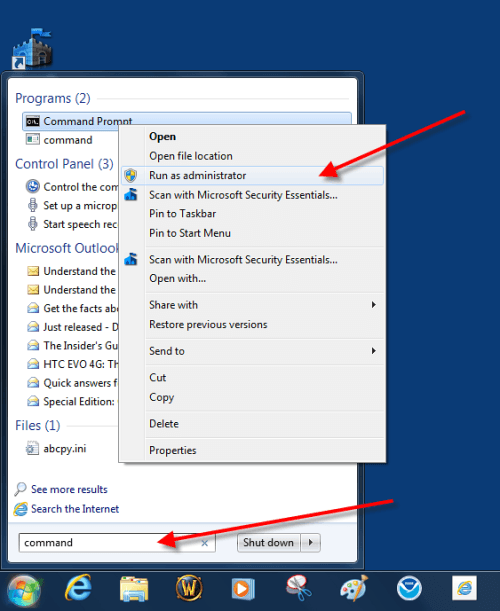
Step1-System-file
Step 2: Once the command prompt window opens, type: sfc /scannow and hit Enter. Make sure that there’s a space between sfc and /scannow .
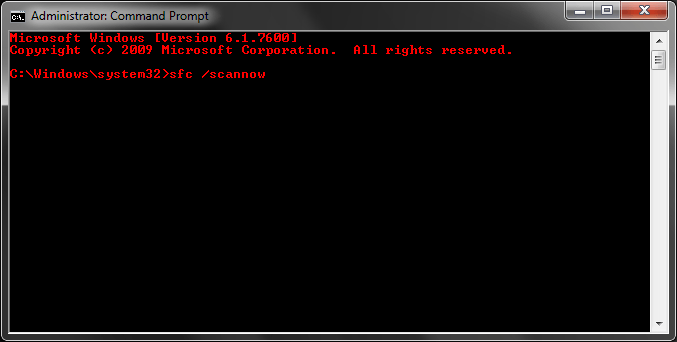
Step 2
Step 3: Now the system scan will begin scanning for corrupted files and repair it if necessary.
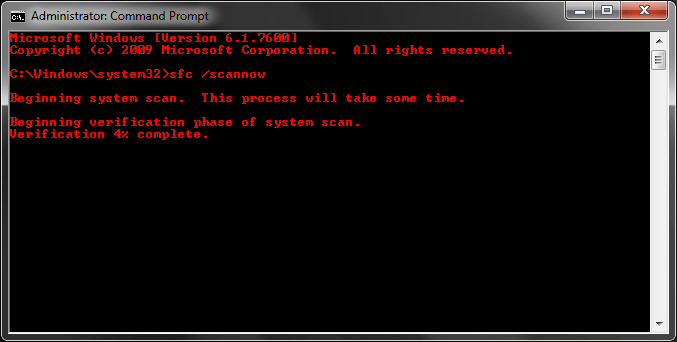
25gwi9f
Step 4: Once the system scan is done, a message will appear whether any system file was corrupted. To exit the command prompt, simply close the window.
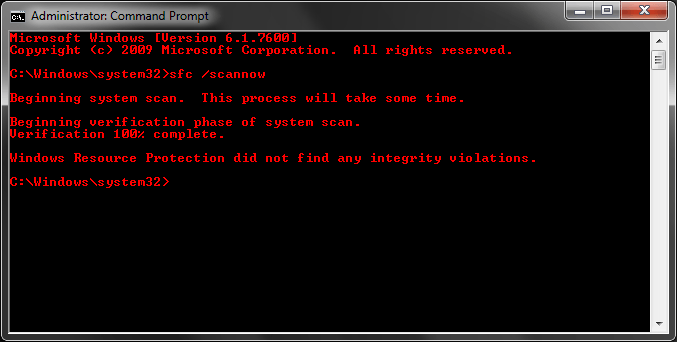
done-system-file-checker
Conclusion
The System File Checker scans for any system files or dll errors and attempts to fix it without forcing a system reboot. If you’ve done all virus checks, troubleshooting and defragging and if Windows still reports errors, you can use the System File Checker.

Don't walk as you are king, walk as you don't care who the king is....!!
Never argue with an idiot. They drag you down to their level and then beat you with experience
[​IMG]
Windows 7-8.1-10 (x86-x64) Aio [320 in 1] - Torrent

Software Version: 6.1.7601, 6.3.9600, 10.0.10240 / v15.09.01
author builds: adguard
Language: English, German, Russian, Ukrainian
Treatment: complete
Type of medicine: Loader, KMS Activator

System requirements:
* Processor: 1 gigahertz (GHz) or higher.
* RAM: 2 gigabytes (GB).
* Free space on hard drive space: 20 gigabytes (GB).
* Graphics card: graphics device Microsoft DirectX 9 or later.
* Additional requirements for the use of certain functions.
* To use the touch features require tablet or monitor that supports multi-touch.
* To access the Windows Store to download and run applications that require an active Internet connection and a screen resolution of at least 1024x768 pixels.
* To bind the application required screen resolution of at least 1366x768

Description: 
The assembly is designed for those who do not like the build with updates from M $. Recently,
Microsoft began adding telemetry to distributions that is not very good. Now for the assembly.
It is based on the original image from the MSDN

Integrated languages: 
English, German, Russian, Ukrainian;
and the inclusion of Net Framework 3.5 (includes .NET 2.0 and 3.0) - only in the distribution of Windows 8.1 and Windows 10.

17.9 Gb
Don't walk as you are king, walk as you don't care who the king is....!!
Never argue with an idiot. They drag you down to their level and then beat you with experience
Splash Screens for Grub4DOS

Put any of these screens on the root of your USB or HD (can also be placed in a folder on the same media) Then open the menu.lst file with notepad and place the following command on top line to display the splash screen while booting your GRUB usb or CD

splashimage xxxxxxxx.xpm.gz
or
splashimage FOLDER NAME/xxxxxx.xpm.gz

(Replace folder name with the folder name of your own selected and replace xxxxxx.xpm.gz with screen you placed in your media e.g. splashimage yumi.xpm.gz or splashimage FOLDER NAME/yumi.xpm.gz)

To download GRUB4DOS Tools and to learn how to activate or use GRUB on your USB/HD, refer to THIS VIDEO TUTORIAL

Size - 78 kb
 https://my.pcloud.com/publink/show?code=XZQjg0Zlur1GHBk4p4oDjQDp8oyyjSzgns7
 
Don't walk as you are king, walk as you don't care who the king is....!!
Never argue with an idiot. They drag you down to their level and then beat you with experience
ZOTAC WinUSB Maker v1.1 - Silent Installer
Easily create a bootable Windows flash drive for your ZBOX mini-PC with the ZOTAC WinUSB Maker utility. The drag-and-drop utility makes creating bootable flash drives quick and painless – just drag the destination and source into the ZOTAC WinUSB Maker, and click start.

ZOTAC WinUSB Maker supports Windows Vista, 7, 8 and 8.1 image files and DVD discs as sources for compatibility with all major operating systems supported by ZBOX mini-PCs. USB flash drive and SD card destinations are supported for simple OS installations on ZOTAC ZBOX mini-PCs.

Features
  • Fast file copy from directory or ISO file
  • Drag and drop source and destination
  • Simple and quick operation
  • Smooth GUI
OS compatibility
  • Windows Vista, 7, 8 & 8.1
  • X86 and x64 
  • UEFI compatible (Windows 8 x64 and higher)
System requirements
  • Windows XP or higher with .NET Framework 4.0 installed

Size - 1 mb
[​IMG]
Don't walk as you are king, walk as you don't care who the king is....!!
Never argue with an idiot. They drag you down to their level and then beat you with experience

Windows 7 - Fantastic 4 Edition by CK Team
Computer Kings Team Members (Rashid Khan, Saqib Mengal & Shehek Baloch) are presenting the latest customised Windows 7. We have work hard to delever the best, now you people have to decide how we have worked. So go and download this tiny yet cool edition to enjoy your computing experience.
Screenshots

Size - 1.2 gb
[​IMG]


Don't walk as you are king, walk as you don't care who the king is....!!
Never argue with an idiot. They drag you down to their level and then beat you with experience
[​IMG]
Skype 7.8.0.102 - Silent Installer [Direct+Torrent]
Skype is a network Instant Messaging and Voice Chat tool, it contains the features that IM required, such as video chat, voice people meeting, many people chat, transfer files, text chat, and other functions. It is free to high-definition voice dialogue with other users, can also make domestic and international calls, regardless of the fixed telephone, mobile phones, PHS can directly dial, and can realize functions such as call forwarding, SMS messages.

Skype allows users to make voice calls over the Internet. Calls to other users with the Skype service are free, while calls to both traditional landline telephones and mobile phones can be made for a fee debit-based user account system. Skype has also become popular for its additional features which include instant messaging, file transfer and video conferencing. Skype does not currently support the DET and the site has been blocked, but many students use it for social networking.
Size - 34 mb
Direct
[​IMG]
Torrent
[​IMG]
Don't walk as you are king, walk as you don't care who the king is....!!
Never argue with an idiot. They drag you down to their level and then beat you with experience
jetAudio Music Player + EQ Plus 6.1.0 Patched
jetAudio for Windows is the highest rated and most downloaded media player on CNET.COM and now you can listen to same high-quality sound on your Android phone using jetAudio. It plays almost any type of digital music files you have (.wav, .mp3, .ogg, .flac, .m4a, .mpc, .tta, .wv, .ape, .mod, .spx, .wma* and more) and, it provides a very high quality sound with various effects and enhancements such as Wide, Reverb, X-Bass.
 
It comes with 32 equalizer presets that will provide a wide array of listening experience.
For those who would like to customize their own sound experience, it also allows 10/20 bands graphic equalizer and other advanced playback functions including playback speed control, crossfading, AGC and much more.
 
Features for Plus version only
* 20-bands graphic equalizer
* Tag Editor (MP3, FLAC, OGG, M4A)
* Display lyrics in tag (Unsynchronized lyrics)
* 2 lock screens
* 14 app widgets : 4x1 (#2), 4x2 (#3), 4x3 (#3), 4x4 (#3), 3x3, 2x2, 2x3
* Pitch shifter
* Precise playback speed control (50% ~ 200%)
* Light Gray/White theme for browser (Plus only)
* Grid mode for Artist/Song/Folder/Genre browser
* Adjust FF/REW interval
* Expanded notification bar (for JB)
* MIDI playback (using jetAudio WaveTable MIDI synthesizer engine)
 
Features for Basic/Plus version
* Can choose between 3 List modes or 10 Grid modes for layout style
(In Basic version, layout style can be chosen in Album browser only)
* Find on YouTube
* Last.fm (requires official Last.fm app)
* X-Wide, Reverb, X-Bass sound effects
* AGC (automatic gain control) to avoid volume fluctuations between tracks
* Speed control from 50% to 200% (pitch adjusted)
* Crossfading, Gap-less playback
* Fade-in/Fade-out
* Repeat AB
* Browser and play music by artits, albums, songs, playlists, genres and folders
* Balance/Volume control
* Sleep timer up to 24 hours
* Flick up to post what you're listening to on Facebook/Twitter
* Flick down to show Now Playing
* Flick left/right to play next/previous
* Lock screens
* Headset button control (Bluetooth headset)
- press to pause/resume
- double/triple press to play next/prev
- long press to mute or TTS (time, title)
* Bluetooth headphone button control
* Send track information via Bluetooth AVRCP 1.3
* Multi-select function (Delete/Add to playlist)
* Keep screen on, Lock orientation options
* Shake to play next/previous track
 
Supporting formats:
MP3, WAV, OGG, FLAC, M4A, MPC, TTA, WV, APE, MOD (module formats S3M, IT), SPX, AIFF
 
Whats New :
- Revised Media Scanner
- Bug fixes
 
Requires Android: 2.3.3 +
 
 
================
[INSTALL NOTES]
================
 
(1): Please use 7Zip/WinRAR/Universal Extractor to EXTRACT FILES
(2): Copy and paste to extSD and Install
(3): Some Apps/Games need "Root"
 

15 mb
Don't walk as you are king, walk as you don't care who the king is....!!
Never argue with an idiot. They drag you down to their level and then beat you with experience
Next PostNewer Posts Previous PostOlder Posts Home